 Proton
A more flexible and productive workplace starts with the realisation that cloud connectivity is much more than just a fast internet connection. It forms the central network that securely connects applications, data, identities and users.
By optimising network connections for modern cloud platforms, organisations can transform fixed office networks into robust digital working environments. This gives employees access to business resources from any location, whilst IT teams retain control over security, speed and costs.
Hybrid working has now become an integral part of business life. Professionals work in the office, at home or from a flexible workspace. The experience must be the same wherever they are: stable, fast and simple. As well as good connections, secure data exchange is also essential. Privacy-friendly cloud storage and well-organised data flows help teams to work simultaneously on documents, analyses and projects. Slow connections and cumbersome login procedures must not get in the way of that work.
Cloud connectivity as the foundation for the modern workplace
What does cloud connectivity mean for businesses?
Cloud connectivity refers to the combination of network technology, network architecture and security policies that enable organisations to connect reliably to private clouds, public clouds and Software-as-a-Service (SaaS) environments. In the past, much of the data traffic passed through a local corporate network and physical servers in the office. Modern connections route data more intelligently to external data centres and cloud providers.
For organisations, this is changing the way in which IT services are delivered. A connection is no longer just a fixed service provided by a telecoms company, but can form part of a company’s policy. Companies can quickly scale capacity up or down, adjust network traffic rules to suit the priority of an application, and verify data as soon as a user requests access.
Why hybrid working requires reliable access everywhere
Most companies with more than ten employees now offer the option of remote working on a permanent basis. The office is increasingly being used for meetings, socialising and brainstorming sessions. Work that requires concentration or involves administrative tasks can just as easily be done from home or whilst on the move. This way of working requires a stable network connection.
When business software is slow to respond or frequently crashes, frustration and a loss of productivity can quickly set in. An employee who keeps losing their connection during a video call or has to wait a long time for project files may sometimes seek out solutions themselves, without IT’s knowledge. A fast, low-latency connection is therefore essential for satisfied employees and a well-protected business environment.
The five layers of a connected digital workplace
A good cloud workplace is not just about technology. You can think of it as a five-layer structure, with each layer complementing the others. The first layer consists of the physical and virtual infrastructure: connections, gateways and computing power. Above that lies security, which protects data whilst it is being transmitted and keeps unauthorised users out. The third layer is about access. Simple authentication and single sign-on determine how quickly an authorised user can get started.
The top two layers are about people. The fourth layer is the social layer. This enables digital meetings, informal conversations and contact between teams via collaboration platforms. The fifth layer is corporate culture. Here, managers focus on results rather than attendance. This also includes clear agreements on availability and a focus on digital skills.
What benefits does cloud connectivity offer modern businesses?
Increasing scalability and flexibility
Traditional IT often requires significant upfront investment in servers, switches and storage equipment. This equipment usually needs to be capable of handling the highest anticipated workload. Cloud connectivity works differently. Businesses pay for what they use and can add network capacity or user licences as soon as the team grows. If demand falls, they can scale back again.
This freedom helps organisations to quickly set up new offices, temporary project sites or teams in other countries. Rather than waiting weeks for physical equipment and its installation, a secure internet connection and centralised policies are often sufficient. New employees can then gain access to the systems they need within a short space of time.
Improving productivity through access to cloud applications
Most business applications, such as CRM, ERP, data analytics and document management, are now offered as cloud services. Direct and well-configured connections to these services minimise delays in searches, large files and data-intensive calculations.
Staff always use the latest version of the software, and documents are updated centrally. As a result, issues with different file versions and corrupted local files are less common. Workflows run more smoothly, and staff can spend more time on their own tasks and on innovation, rather than on technical problems.
Accelerating collaboration between the office, home and on the move
Business operations rarely proceed step by step within a single department. Often, different teams, suppliers and partners work simultaneously towards the same outcome. Cloud connectivity makes it possible to collaborate on documents, use online whiteboards and make video calls, regardless of the participants’ devices or locations.
This permanent connection enables decisions to be made more quickly. Documents no longer need to be sent by email each time for approval. Notifications and responses are processed directly within collaboration platforms. As a result, projects are often completed more quickly.
Which network architecture is best suited to cloud usage?
When does the traditional corporate network reach its limits?
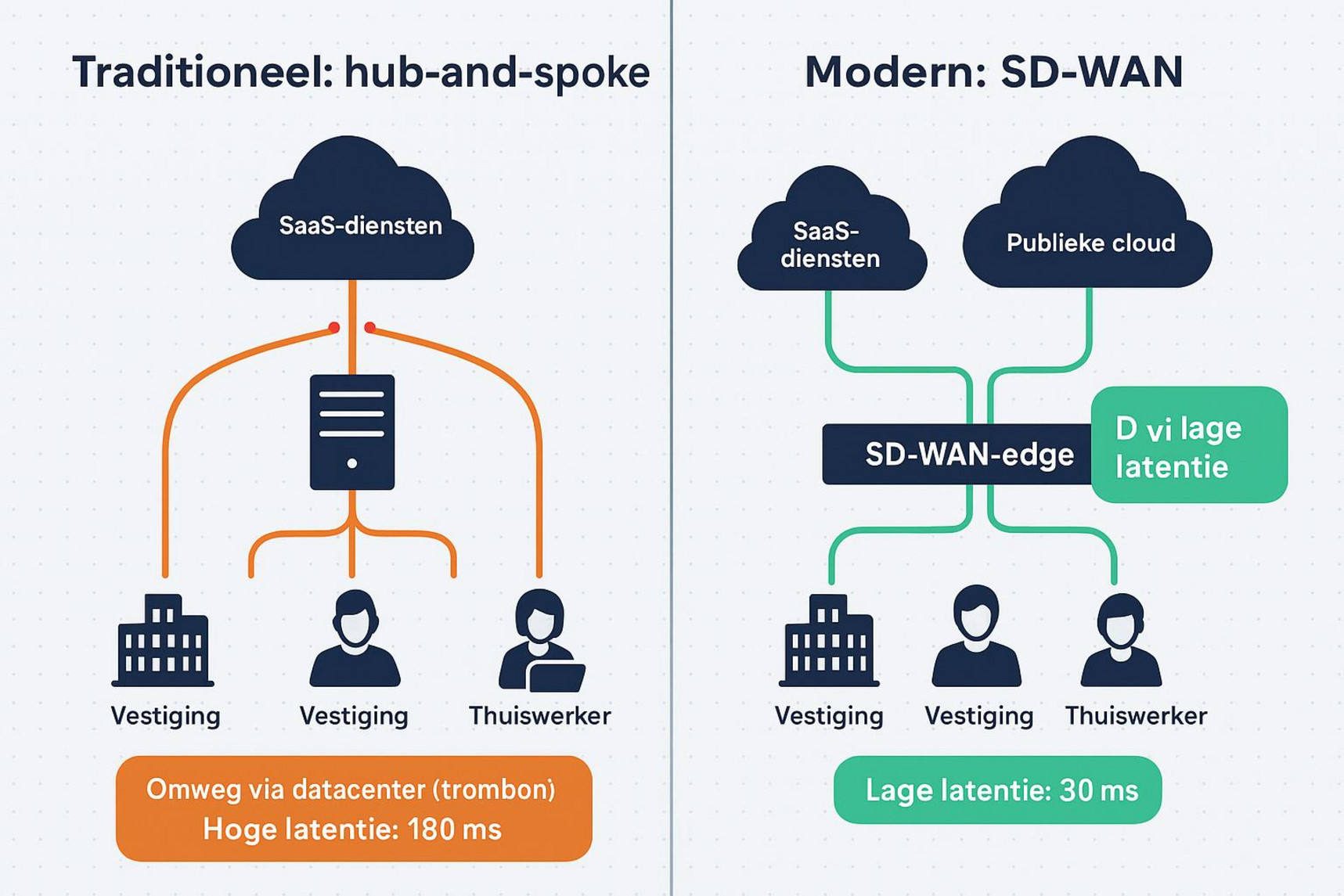
Many companies have traditionally used a so-called ‘hub-and-spoke’ network. In this setup, all traffic from smaller branches is first routed via expensive MPLS connections to the head office or data centre. There, it is monitored before being sent to the internet. Now that employees are making extensive use of SaaS services and video calls, this detour is increasingly becoming a bottleneck.
This is also known as network congestion. It causes additional delays, lost data packets and excessive traffic via the central internet connection. Users experience choppy audio and video, slow downloads and unresponsive software. Meanwhile, the cloud application itself may be functioning perfectly well. Nevertheless, the helpdesk receives numerous reports of poor performance.
From local networks to cloud-based connections
A cloud-focused network architecture shifts the focus from the physical data centre to the internet and the network periphery, also known as the ‘edge’. Branches and remote workers are provided with a direct local internet connection. Traffic to trusted business cloud services then goes directly to an access point located near that service.
This approach reduces the load on the corporate network and shortens the data path. Security functions that used to be housed in on-premises firewalls can be moved to a distributed security layer in the cloud. That layer authenticates users, regardless of their location.
Compare SD-WAN, internet connections and direct cloud connections
To build a cloud-focused network architecture, organisations often combine three types of connection: Software-Defined WAN (SD-WAN), business internet connections and direct private connections to cloud platforms, such as Azure ExpressRoute or AWS Direct Connect.
SD-WAN acts as a smart controller across multiple physical connections, such as fibre, 5G and broadband. The software recognises which application is sending data and selects the appropriate route based on this. For example, a business video call can be prioritised via a stable connection, whilst a large backup is sent via a cheaper broadband line. Private connections to cloud platforms are mainly used between key locations and specific cloud regions. They are suitable for applications that require fixed bandwidth and minimal fluctuations in speed.
How do you build a secure and manageable cloud workplace?
Applying Zero Trust to users, devices and applications
In a network without clear physical boundaries, a user cannot automatically be trusted simply because they are in the office or using a specific IP address. The Zero Trust principle is based on the idea: never trust, always verify. Every request to access company data is checked and approved individually. This applies equally to a computer on the executive floor and to a device connected to public Wi-Fi.
Zero Trust Network Access (ZTNA) offers an alternative to the traditional VPN. Once logged in, a VPN often grants a user access to a large part of the network. ZTNA, on the other hand, only grants access to the specific application required for the task at hand. If an account is compromised, this makes it more difficult for an attacker to move around the network.
Managing identity management and multi-factor authentication
In a cloud environment, the user’s identity is the first key layer of security. Identity & Access Management (IAM) brings together users, groups and roles across all applications. This enables IT to revoke a departing employee’s access across all platforms in one go.
Multi-factor authentication (MFA) provides the minimum additional level of security. Modern systems also take into account the circumstances surrounding a login attempt. If the attempt originates from a recognised company device and at a usual time, access is usually granted without any additional steps. If the attempt comes from an unknown country or at an unusual time, the system will request additional verification or block the session.
Centralised monitoring and management of cloud environments
A distributed working environment requires a clear overview. Secure Access Service Edge (SASE) brings network and security functions together in a single cloud platform. Examples include Cloud Access Security Brokers (CASB), Secure Web Gateways (SWG) and ZTNA. This means IT teams no longer need to constantly monitor numerous separate programmes and dashboards.
Centralised monitoring looks beyond security incidents. It also focuses on the Digital Employee Experience (DEX), or the digital work experience of employees. By collecting data on network latency, device performance and application response times, administrators can identify and resolve issues before they affect employees.
Which technologies make staff more productive?
Using Microsoft 365 and other cloud applications together
Integrated platforms such as Microsoft 365 form a key foundation of the modern workplace. The components complement one another. Teams supports communication via channels, SharePoint offers document storage and intranet functions, and OneDrive is designed for personal files. By using these components together, data is less likely to remain locked away in isolated systems.
Integrations with specialised SaaS programmes, such as CRM systems, ticketing systems and accounting software, can also speed up work. Staff can approve forms, view customer details or assign tasks directly from their communication programme. This means they don’t have to switch between different windows and login pages as often.
Using AI and automation for repetitive tasks
Generative AI and automated workflows are transforming the way we work on a day-to-day basis. AI assistants can summarise lengthy email exchanges, take minutes of meetings with action points, and help draft documents or write code. This reduces the amount of mental effort required for simple preparatory tasks.
Automation tools use APIs to link different cloud services together. This enables incoming invoices to be processed automatically, new customers to be registered automatically and project statuses to be updated automatically. As a result, staff have more time for analysis, planning, strategy and liaising with others.
Introducing cloud connectivity without disrupting business operations
Mapping out the current infrastructure, applications and working habits
A successful transition begins with a clear assessment. Companies need to review their equipment and internet connections, but also examine which applications they use. Which programmes are required for day-to-day work? Where are the databases located? How much latency can different user groups tolerate?
The nature of the work itself must also be considered. A field-based employee has different requirements regarding accessibility and mobile screens than a financial controller at head office. By clearly defining these user groups, the IT department can avoid rolling out a single solution that is neither user-friendly nor practical for a large proportion of staff.
Setting priorities based on risk, costs and productivity
Not every system needs to be upgraded at the same time. Organisations can draw up a list of priorities that weighs up risks, expected productivity gains and the costs of the transition. Frequently used programmes and email are often good candidates for the first phase. The benefits then become apparent quickly to many employees.
Legacy applications that are heavily reliant on local databases require more preparation. It may be better to modernise these programmes in the longer term. Another option is to make them temporarily available via a virtual desktop. This ensures that key business processes continue to run whilst the organisation develops a new solution.
Working in manageable steps with a hybrid transition phase
A one-off migration, where everything is changed at once, can seriously disrupt day-to-day work. A phased approach using a hybrid model makes it possible to trial new connections, identity integrations and security policies with a small test group first.
During this period, old and new network connections often operate side by side. Good communication and clear training are therefore essential. A technical change will only work effectively if staff feel comfortable with the new way of working and know how to use the new tools.
How much does cloud connectivity cost, and what risks does it entail?
Calculating investments in connectivity, security and management
A cloud model replaces part of the major investments in hardware – also known as CapEx – with more predictable running costs, or OpEx. This does, however, change the way costs are incurred. Licences for SASE services, cloud security and additional bandwidth from multiple internet service providers must be factored into the budget each year.
Variable costs can also lead to unexpected expenses. Examples include data egress charges, which cloud providers levy for transferring data out of their platform, and costs for data traffic between networks. If the design is poor, these costs can mount up. FinOps helps with this. Under this approach, technical and finance teams work together to assess how much cloud resources are being used. This enables them to identify and reduce waste more quickly.
Controlling privacy, regulations and data location
Moving network traffic and storage to external providers entails legal obligations. European organisations must take into account the General Data Protection Regulation (GDPR), sector-specific standards such as NEN 7510 in the healthcare sector, and the Digital Operational Resilience Act (DORA) for financial organisations.
The European Data Act also contains rules on switching between cloud services. Cybersecurity regulations such as the NIS2 Directive set out requirements regarding suppliers’ security measures and the reporting of incidents. Companies must know exactly in which countries or regions data is processed and stored, who has access under the contract, and what measures are in place to prevent foreign legislation from leading to unauthorised access.
What does the future hold for the connected workplace?
Workplaces with more AI and automated control
Network and workplace management are increasingly being automated. Artificial Intelligence for IT Operations (AIOps) can analyse large amounts of data about systems and connections in real time. If an internet route is becoming congested or an access point is causing a cloud-related issue, the network can automatically reroute traffic itself. This means an administrator does not always need to intervene manually.
Applications, too, are increasingly adopting so-called agentic workflows. In these workflows, AI agents work independently with various cloud platforms to carry out tasks for employees. This requires robust API integrations and flexible identity management. After all, not only people, but also digital assistants must be clearly identifiable and granted only the appropriate permissions.
A more flexible and productive workplace requires continuous improvement
Digital transformation has no fixed end point. A connected workplace must constantly be adapted to new technology and new ways of working. Organisations must therefore also pay attention to digital well-being and the wellbeing of staff. As work and private life become increasingly intertwined, clear agreements are needed regarding focus hours, availability and times when staff can be offline.
IT architects must also continue to consider a potential switch to a different supplier. By using open file formats, agreeing flexible contracts and opting for portable identity standards, an organisation retains greater control over its own digital environment. A workplace designed to stand the test of time gives employees freedom whilst preventing excessive dependence on a single technology company.